
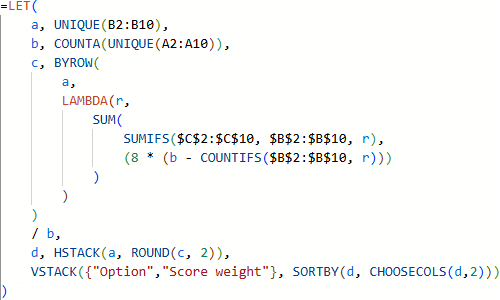
Microsoft Excel 1.0 was released in 1985, 40 years ago. Since then, Excel has evolved with new functions and features. In our view, the most significant recent change to Excel is the introduction of Dynamic Arrays, along with the release of associated new worksheet functions, which have fundamentally changed how formulae work.
Of the new functions introduced in the last few years, we believe that the LET and LAMBDA functions are the most important because they can dramatically change the way users write formulae.
But there's a price to be paid for the new functions: we're concerned that they encourage users to write long, complex formulae. As discussed in our good practice guideline Keep formulae simple, long and complex formulae are problematic and are best avoided. Specifically, research has demonstrated that long and complex formulae are harder to understand, more difficult to correctly modify, and are more error prone.
To see if our concern has materialized, we examine current Excel worksheet function usage. We're especially interested in how the usage of LET and LAMBDA functions differs from the usage of other functions in formulae.
Therefore, in this article, we explore a new corpus of Excel formulae that we have collated: the 2025 Reddit Excel Formula Corpus.
We focus on four metrics:
- Identifying the most commonly used functions.
- Usage of related functions.
- The number of functions per formula.
- Formula length, in characters.
For each of these metrics, we describe and compare statistics for the 2025 Reddit Excel Formula Corpus formulae overall, formulae that exclude the LET and LAMBDA functions, and formulae that use the LET and LAMBDA functions. We also compare the most commonly used functions in the new corpus with earlier lists of commonly used functions, to see how function usage has changed.
Purpose of the guidelines
The purpose of our spreadsheet good practice guidelines is simple: Help you make better spreadsheets. We aim to do that by presenting a detailed guide for what makes a good spreadsheet, as a means of reducing errors and alleviating the pain caused by bad spreadsheets.
The guidelines collate content that we've accumulated over many years, distilled from practical experience in designing, building, and testing spreadsheets, supported by an extensive review of the relevant academic literature.
Our target audience is broad, covering everyone who works with spreadsheets. We're especially focussed on the people who build spreadsheets used by others. People who inherit a spreadsheet, built by someone else, receive a special mention – they need all the help they can get.
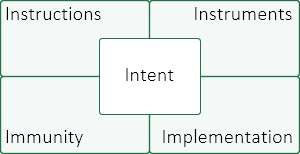
Our iⁿ spreadsheet methodology defines questions necessary for stakeholders to have confidence in their spreadsheets. The methodology specifies criteria for designing, building, and validating spreadsheets to ensure that they work correctly.
The iⁿ spreadsheet methodology consists of five parts:
- Intent.
- Instructions.
- Instruments.
- Implementation.
- Immunity.
Each part consists of five questions designed to help you make better spreadsheets.
Check out our "Spreadsheet good practice guidelines" booklet on Amazon.
Good spreadsheets are essential for informing decision making. But most spreadsheets are not good. The objective of this booklet is to help you make better spreadsheets, so you can make better decisions.
The spreadsheet good practice guidelines consist of five one-page modules, each of which summarises a key aspect of making better spreadsheets:
- Design principles. Deliberately design every spreadsheet, applying the spreadsheet design principles and their supporting questions.
- Spreadsheet Development Life Cycle. Every spreadsheet goes through distinct phases during its life, from Planning to Archive. Manage the life cycle and allocate appropriate time to each phase.
- Top 10 good practices. Applying these good practices will help you make better spreadsheets.
- Top 10 most common errors. Avoid these errors to improve the quality of your spreadsheets.
- Test, test, test. All spreadsheets must be tested. Learn how to test a spreadsheet, applying our detailed testing procedure.
Spreadsheets are riddled with errors. To reduce the risks our practices must improve.
The objectives of this presentation are to:
- Highlight the risks of heedless spreadsheet development.
- Outline ways to reduce those risks.
We provide guidance based on:
- Hard-fought practical experience.
- Academic literature on spreadsheet risks and best practice.

An important aspect of a spreadsheet's fitness-for-purpose is ensuring that its run time is acceptable to the users. Creating an inefficient spreadsheet is easy, while creating an efficient spreadsheet requires a bit more thought and the application of some techniques to reduce run time.
This article presents an example of using refactoring techniques to vastly improve the run time of a spreadsheet. We focus on an especially slow feature of Excel: the interaction between VBA and the worksheets.

People are remarkably accurate when doing a wide range of activities, including working with spreadsheets. Even so, the bottom line result of every spreadsheet is almost certainly wrong.
For example, if you have a spreadsheet consisting of 100 used cells and a moderate 3% probability that each cell contains an error, then the probability that the spreadsheet's results are wrong is 95%.
This article explores how and why the cascading structure of spreadsheets leads to a high error rate, and then we consider what we can do about it.

Incorrect use of Excel's NPV function is a common source of spreadsheet errors. This article discusses several pitfalls and suggests ways to avoid them.
Summary of key points:
- Excel's
NPVfunction is a common source of spreadsheet errors. - Even simple spreadsheets often contain material errors.
- When using the
NPVfunction, errors that commonly occur include: referencing the wrong cells, constant jamming, inadequate documentation, inconsistent assumptions about cash flows being real/nominal and before/after tax, misinterpretation of an ambiguous model specification, and incorrect cash flow timing. - Finding and correcting errors requires inspecting every cell for errors to ensure that assumptions are consistent, functions are used correctly, good practice is followed, and the spreadsheet appropriately represents the situation being modelled.

FizzBuzz is a simple word game that is sometimes used as a test for programmers. Here we use FizzBuzz to illustrate the importance of documenting your spreadsheet.
Summary of key points:
- There are often many ways to write a spreadsheet formula.
- Documentation is a very important, though often neglected, part of every spreadsheet.
- Including documentation is important because it makes a spreadsheet easier to understand and use.
- Types of documentation include cell comments, an 'About' worksheet, and text boxes.
- Cell comments can be especially useful for describing how a formula works and pointing out subtleties that might otherwise not be obvious to the user.
- Ensure that the documentation is updated as the spreadsheet changes.
Essential reading

Latest articles
Consulting
We can help you make better spreadsheets:
- Reviewing your spreadsheets for errors.
- Advice about improving your spreadsheets.
- Training in spreadsheet good practice.
