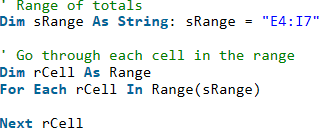
Ever feel like all the VBA examples are way simpler than the code you face in real life? A post with simple code is good for explaining a topic clearly. But the real world is more complex.
In this post, I take code from a real world application and:
- Explain it to you in simple English.
- Convert it to code a professional would write.
- Show you an alternative way of writing the same code.
If you understand the ideas presented here it will dramatically improve you skills when you deal with real world VBA code.
Full article: How to deal with real world VBA code
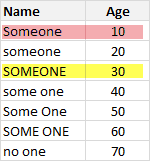
We all know that VLOOKUP (and its cousins MATCH, HLOOKUP and LOOKUP) are great for finding information you want. But they are helpless when you want to do a case-sensitive lookup.
So how do we write case sensitive VLOOKUP formulas? Simple. We can use EXACT formula.
Full article: Case sensitive lookups
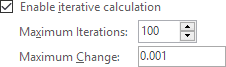
Circular references in Excel are generally bad news:
- They are slow to calculate.
- They can be hard to detect.
- An intentional circular reference can mask an unintended circular reference.
- They do not always converge.
- The Status Bar always shows calculate even in Automatic Mode.
Circular references should be avoided wherever possible. This article explains how.
Full article: Excel circular references: Calculation, detection, control and removal

Spreadsheets are in daily use in hundreds of millions of businesses around the world. In the US 95% of companies use spreadsheets as financial reporting tools. That makes the humble spreadsheet one of the most powerful tools out there. However, it is also probably one of the biggest threats to your business!
An incredible 90% of spreadsheets contain errors. It is not all doom and gloom though – a bit of forethought and planning could help protect you and your business. Follow this 10-step plan and you will eliminate the majority of possible threats to your business:
- Decide on what it is that you want from your spreadsheet.
- Check your actual need for a spreadsheet.
- Separate data and functionality.
- Minimise duplicating data.
- Keep manual data entry to a minimum.
- Document everything.
- Build in error checking.
- Keep it simple.
- Lock it down.
- Quality check.
Full article: Not available
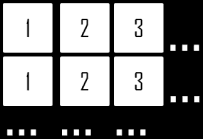
The VBA array is a very convenient and efficient structure for storing multiple items of usually the same data type. The size of a VBA array can be either fixed or dynamic depending on how it is declared. VBA arrays can also be 1 or multi-dimensional.
This article presents a comprehensive overview of using VBA arrays.
Full article: VBA: The VBA array
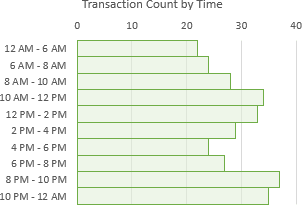
In this article we are going to learn a few different ways to summarize data based on time groups (increments of hours or minutes):
- Solution #1 – Group time with a Pivot Table.
- Solution #2 – The
FLOORfunction. - Solution #3 – The
VLOOKUPfunction.
The quickest and easiest method is probably to use the Group feature in a Pivot Table. If you want to group the times in increments of multiple hours or fractions of an hour, then the FLOOR and VLOOKUP functions can help group the times.
Full article: 3 ways to group times in Excel
Writing VBA code is hard, but properly debugging code is even harder. Sounds like non-sense? Well I dare say developers spend more time debugging code than writing it. Looking for errors is what developers do most of the time! A critical part of debugging is proper error handling (VBA error handling in our case).
So, let's learn how to properly handle errors in VBA.
Full article: Proper VBA error handling

The VLOOKUP function is often used to prove a bare minimum of Excel knowledge because it's both useful and common. However, VLOOKUP is often not used properly and is a common cause of errors.
Full article: True Vlookup tragedy
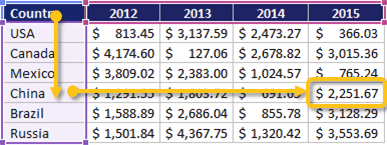
The function combination OFFSET MATCH MATCH can be useful for looking up values in a two dimensional array of data. The primary benefit of using OFFSET MATCH MATCH is that it is intuitive and that many people are familiar with the OFFSET formula.
In some ways, using the OFFSET function to find a lookup value is more intuitive than using the INDEX function because it is very similar to moving a piece around a chess board.
Additionally, some people are more familiar with the OFFSET function than they are with INDEX; in that situation, it may make sense to go with OFFSET MATCH MATCH as your lookup formula.
Full article: How to use OFFSET MATCH MATCH