6 June 2013
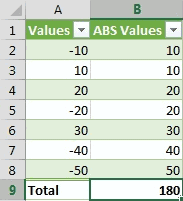
A colleague of mine asked me today how to go about using MS Excel formulas to calculate the sum of absolute values from a given dataset. This question crops up quite often on the forums so I thought I'd put together a quick blog post on it.
There isn't a built-in SUMABS() (or equivalent) worksheet function so you have to do a little bit of work to get the right answer.
Three options:
- Use a helper column.
- Use a
SUM()array formula orSUMPRODUCT(). - Use
SUMIF().
Full article: Calculate the absolute sum in Excel