31 January 2016
In this tutorial, you will learn a few quick and efficient ways to check and debug formulas in Excel:
- Use F2 to edit Excel formulas.
- Use F9 to evaluate and debug formula parts.
- Debug a formula by using the Evaluate Formula feature.
- Highlight and match parenthesis pairs in Excel formulas.
- Highlight all cells a given formula refers to.
- Highlight all formulas that reference a given cell.
- Trace formula relationships in Excel (Trace Precedents and Trace Dependents).
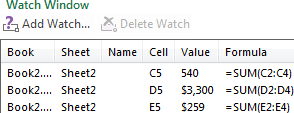
- Monitor formulas and their calculated values (Watch Window).
Full article: How to edit, evaluate and debug formulas in Excel