11 December 2015
One of Excel's greatest cell reference features is a 3D reference, or dimensional reference as it is also known.
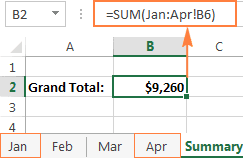
A 3D reference in Excel refers to the same cell or range of cells on multiple worksheets. It is a very convenient and fast way to calculate data across several worksheets with the same structure, and it may be a good alternative to the Excel Consolidate feature.
This blog covers:
- What is an Excel 3-D reference?
- Creating a 3D reference in Excel.
- Including a new sheet in an existing 3D formula.
- Creating a defined name for a 3D reference.
- List of functions supporting 3D references.
- How Excel 3D references change when you insert, move or delete sheets.
Full article: 3-D reference in Excel to calculate multiple worksheets with a single formula